How to Write the Johnny Depp AI Trend Prompt
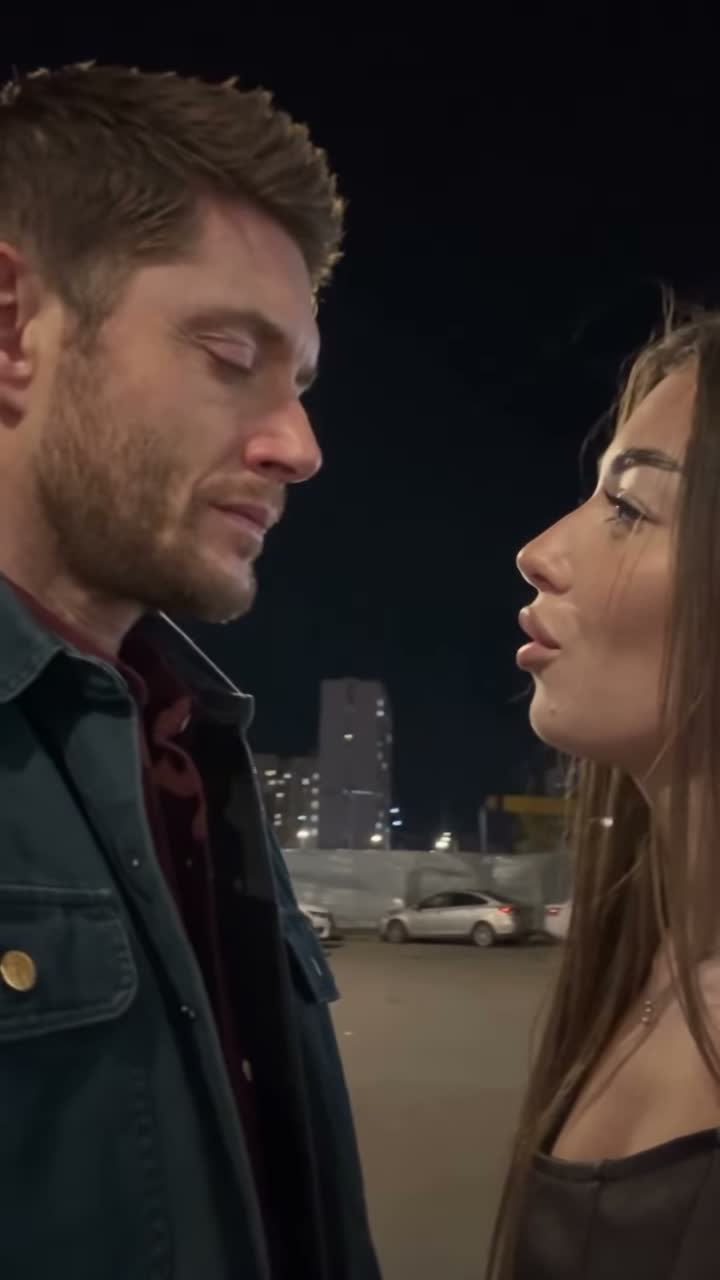
The recognizable part is the pause: a woman looks up, a man steps into a night-time parking-lot shot, then they hold eye contact. A good prompt assigns identities before it describes the romance. Here are three cast instructions, a shared scene prompt and the fixes for mixed faces or rushed action.
What the reference actually shows
The @valentikalinka reference reel was posted on 5 November 2026. Our 12-second reference has a residential parking area, apartment buildings, parked cars and a handheld close two-shot. It is a reference example of the AI trend, not footage generated by this site. The soundtrack's title has not been verified.
1. Choose one of three cast instructions
Use the photos as identity references rather than first frames. Keep the instruction for your chosen version at the top of the prompt. The photo numbering changes in the one-photo modes.
| Version | Upload | Cast instruction to copy |
|---|---|---|
| Replace both (default) | Image 1: man. Image 2: woman. | Replace the man on the LEFT with the adult in reference image 1. Replace the woman on the RIGHT with the adult in reference image 2. Preserve each assigned face, hair, build and outfit. Never swap identities. |
| Keep the man | Image 1: woman only. | Keep the man from the reference video unchanged in every frame. Replace ONLY the woman on the RIGHT with the adult from reference image 1. Never apply that image to the man. |
| Keep the woman | Image 1: man only. | Keep the woman from the reference video unchanged in every frame. Replace ONLY the man on the LEFT with the adult from reference image 1. Never apply that image to the woman. |
A single uploaded photo is always reference image 1. Keep the man does not mean upload a man's photo: you upload the person being replaced.
2. Add this shared scene and action prompt
Create a photorealistic 12-second vertical 9:16 video. Use the silent reference video for setting, blocking, framing and timing. A residential parking area at night: white parked cars, tall apartment buildings with lit windows, warm street lighting and a dark sky. The man stays on the LEFT; the woman stays on the RIGHT. Tight handheld smartphone framing with subtle natural sway, one continuous take.
0–1.5s: the woman looks upward toward the left edge, where the man is still outside the frame. 1.5–3s: he enters from the left and leans slightly toward her. 3–9s: both side profiles fill the frame; she looks up into his eyes and he looks down into hers. Keep the gaze, with natural blinks and breathing. 9–12s: their expressions soften into small smiles. Keep a little space between their faces. Neither looks into the lens.
Exactly two adults. Keep the same faces, hair, outfits and height difference throughout. No identity blending, no role swaps, no kiss, no dancing, no dialogue, no exaggerated lip motion, no scene changes, no captions or logos. Use quiet street ambience, no dialogue or music. Add the chosen soundtrack afterwards.
Use observable actions: looks up, enters from left, holds eye contact, smiles slightly. Adjectives such as romantic and cinematic alone do not tell the model what happens or how long to wait.
3. Let the reference control motion, the photos control people
- Use one clear portrait per replacement role, with visible face and shoulders. A three-quarter view can help with the side profile.
- State that the photos supply identity and outfit only. Otherwise the model may import a bedroom or selfie pose into the parking area.
- Keep the entrance brief and reserve most of the clip for eye contact. Extra gestures compete with the defining pause.
- The unchanged partner must come from the same reference clip, not a newly invented description of a celebrity.
4. Fix the common failures
| Problem | Prompt change |
|---|---|
| Faces swap or merge | Repeat the left/right role assignment and the image number. Remove any sentence that describes both people as image 1. |
| The wrong person changes | Use replace ONLY, and explicitly preserve the other partner from the reference video. |
| They kiss or dance | Remove dramatic romance instructions. Ask for a small space between faces, quiet breathing and a held gaze. |
| They look at the viewer | Specify their eye-lines: she looks up at him, he looks down at her; neither looks into the lens. |
| The output rushes through the scene | Give the gaze its own 3–9s interval and remove extra cuts or actions. |
5. Generate with the template
Open the maker
Open the Johnny Depp AI Video generator. Replace both is the default.
Choose your version and photos
Upload man and woman separately for duo; upload just the replacement person for either one-photo version.
Pick the quality
MiniMax H3 via Kie: 720p costs 140 credits, 1080p costs 200. These tiers use H3’s native 768P / 2K output; 480p is not offered. Every version produces a 12-second 9:16 video.
Choose sound and generate
Soundtrack on replaces H3’s generated audio with the reference track after generation, following the Popstar workflow. Switch it off for a muted final video, then add a sound within your posting platform. Download the MP4 and label the result as AI.
Make the Johnny Depp AI Video video with 1–2 photos
12-second 9:16 video with the trend sound, from 140 credits. No prompt needed.
Open the Johnny Depp AI Video generatorFAQ
Should I put Johnny Depp's name in the prompt?
The search name helps people find the trend. For consistent results, bind the actual photos and the reference partner rather than relying on a celebrity name to produce a particular face.
Does the template need my prompt?
No. Its three versions already contain role bindings and timing. These examples explain how to write the prompt yourself in a video tool that accepts image and motion references.
Does the prompt recreate the song?
No. Our generator uses a silent motion reference and replaces H3’s audio with the reference track when enabled, or mutes the final video when disabled. The song title is unverified; you can add your own platform sound instead.