How to Do the Coldplay Kiss Cam AI Trend
The Coldplay kiss cam AI trend recasts one of the most played concert clips ever: two people hugging in a box seat get caught on the giant round stadium screen, one hides their face and the other drops below the railing. In October 2026 creators started putting sitcom couples, coworkers, friends and grandparents in that box seat. This guide covers where the trend came from, the beats that make it work, the two-photo way, the filter route, the do-it-yourself prompt and what not to do.
What the Coldplay kiss cam trend is
On 17 July 2025 a fan at a Coldplay stadium concert near Boston filmed the round screen as the kiss cam cut to a couple in a box seat. The moment they saw themselves, she covered her face and turned away and he ducked below the glass railing. The original clip passed 133 million plays, and parodies started the next day.
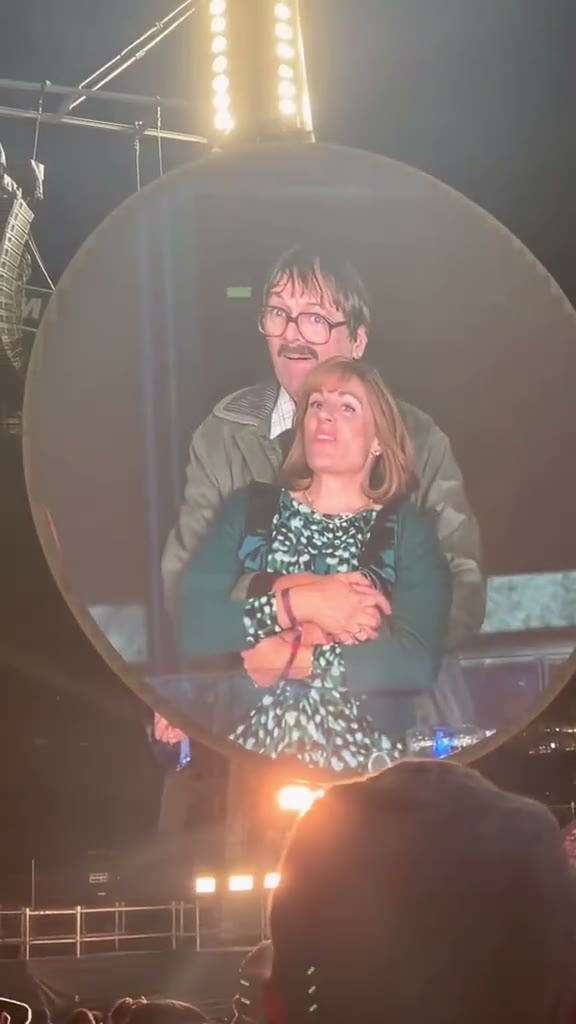
The AI wave came more than a year later. On 15 October 2026 @capcuttingcorner posted an AI version with two sitcom characters in the box seat, shared as a CapCut template, and other versions followed within days. Some posts call it the Coldplay affair trend or the Coldplay concert AI video. The format is fixed: phone in the stands, round screen, hug, hand over mouth, duck, turn away. Only the two people change.
The 10 seconds, beat by beat
The AI versions squeeze the original 16 seconds into 10. The order never changes:
| Time | What happens | Why it matters |
|---|---|---|
| 0–2 s | A phone in the stands films the round screen: one person hugs the other from behind at the railing | Sets the scene in one shot; the screen inside the shot is what makes it look real |
| 2–3.5 s | They see themselves: a hand flies over a mouth, a jaw drops | The moment people pause on |
| 3.5–5 s | The one hugging drops below the railing; the other turns away and hides | The joke of the whole trend |
| 5–8 s | The one left behind slowly looks back at the camera, caught | The ending the AI versions added |
| 8–10 s | Fans around them lean in laughing and cheering | Sells the stadium |
Keep the couple on the screen, not in front of the camera. A clean close-up of two people hugging loses the effect; the round screen, the truss and the heads in the foreground are what people recognise.
What you need
- Two photos, one person per photo, waist-up or full-body, face clearly visible. Photo 1 hugs and ducks, photo 2 gets caught.
- Permission from both people. Never use photos of the real couple, of public figures or of children.
- An AI video tool that takes two reference photos: our Coldplay kiss cam template, or a general image-to-video model such as Seedance, Kling or Veo.
- The trend sound, added in TikTok when you post. Our template gives you crowd sound and no music.
Method 1: the two-photo way (about 5 minutes)
Open the template
Go to the Coldplay kiss cam AI generator. The stadium, the round screen, the box seat and the beats are set up.
Upload two photos
Photo 1 is the one hugging, photo 2 is the one being hugged. Swap them to switch who ducks. No photos to hand? Try the sample people first.
Pick a model and quality
Seedance 2.0 is the default; MiniMax H3 is a cheaper option. The video is 10 seconds, vertical 9:16.
Generate and download
You get the MP4 in a few minutes; failed videos are refunded automatically. Post it with the trend sound and label it as AI-generated.
Make the Coldplay Kiss Cam video with 2 photos
10-second 9:16 video with its own sound, from 35 credits. No prompt needed.
Open the Coldplay Kiss Cam generatorColdplay kiss cam filter vs CapCut template vs AI
| Filter / CapCut template | AI generator | |
|---|---|---|
| How it works | Pastes your faces onto the old clip | Films the scene again from your photos |
| Movement | Faces stay still while bodies move | Both people hug, react, duck and turn |
| Clothes | The original couple's clothes | The clothes from your photos |
| Real couple in the video | Their bodies are still there | Not used at all |
| App | TikTok or CapCut | Any browser |
Filters are quick if you only want a joke for your story. The AI route is why the October versions look like real phone footage from the stands, and it leaves the people from the original clip out of your video entirely.
Method 2: make it yourself with an AI video model
You can rebuild the moment with an image-to-video model that accepts two reference photos. The challenge is the framing: the model has to film a screen inside the shot and keep both faces recognisable at stadium-screen quality.
Choose a model that takes two reference photos
Seedance 2.0 and MiniMax H3 handle two faces well; Kling and Veo work too. Pick 9:16 and 10 seconds.
Write the scene and the beats
See the checklist below: the screen inside the shot, the two roles, the beats with times and the sound.
Test at low resolution
Iterate at the lowest quality until the duck lands around 4 seconds and the look back is clear, then render in higher quality.
Add the sound in TikTok
Use the trend's sound when you post instead of generating music.
What your prompt has to cover
- A screen inside the shot. A phone in the stands at night, filming a giant round LED screen under a truss, fans' heads in the foreground. The couple is only ever on that screen.
- Two people, two roles. Photo 1 hugs from behind and ducks below the railing; photo 2 is hugged, covers their mouth, turns away and looks back.
- Beats with times. Hug, notice, duck, turn away, look back, crowd. Ten seconds go fast; untimed reactions land too late.
- Crowd, not music. Stadium crowd sound, laughter and cheering, no song and no dialogue.
- No text, no logos, no band. Generated captions and fake logos are the quickest way to make it look fake.
Common mistakes and how to fix them
- It looks like a clean close-up. Describe the phone filming the screen, with the truss and the heads in the foreground.
- Nobody ducks. Say who lets go and drops out of sight below the railing, and at what second.
- Faces swap or merge. Use two photos that look clearly different, and say which photo plays which role.
- Using the real couple. Don't. Recast the moment with yourself, friends who agreed, or AI-generated people.
- Generated music. Ask for crowd sound only and add the trend sound in TikTok.
Label your video as AI-generated where TikTok, Instagram or YouTube ask. It is required on most platforms and does not hurt reach.
Coldplay kiss cam examples
The original fan clip, the first parody, and the AI versions that brought the trend back in October 2026.
trouble in paradise?? 👀 #coldplay #boston #coldplayconcert #kisscam #fyp
No. 4 would have defo thrown off Chris Martin 🤔 #coldplay #coldplayconcert #coldplayaffair
kiss kiss!! #kisscam #broadcast #aitrending #viral
Try this filter #CapCut #pioneertemplate #capcutpioneer #fridaynightdinner #coldplay
Try this filter here #CapCut #capcutpioneer #pioneertemplate #theoffice #coldplay
coldplay concertaffair coldplay concertaffair ai video
Make the Coldplay Kiss Cam video with 2 photos
10-second 9:16 video with its own sound, from 35 credits. No prompt needed.
Open the Coldplay Kiss Cam generatorFAQ
How do I do the Coldplay kiss cam trend on TikTok?
Make the video with two photos in the template on our site, download the 10-second vertical MP4, and post it on TikTok with the trend sound. Label it as AI-generated.
Is there a Coldplay kiss cam filter?
Yes, TikTok and CapCut have several kiss cam filters and templates that paste faces onto the old clip. An AI generator films the scene again with both people moving, from two photos, in the browser.
Can I use the real couple or a celebrity?
No. Use photos of yourself, of friends who agreed, or of AI-generated people. Putting real people in a cheating joke without their consent can hurt them and breaks most platforms' rules.
Does the video include the Coldplay song?
No. It has stadium crowd sound only. Add the trend sound inside TikTok when you post.
How long does it take?
About five minutes with the template, most of it waiting for the video. Failed videos are refunded automatically.