How to Make the Tiny Desk AI Video
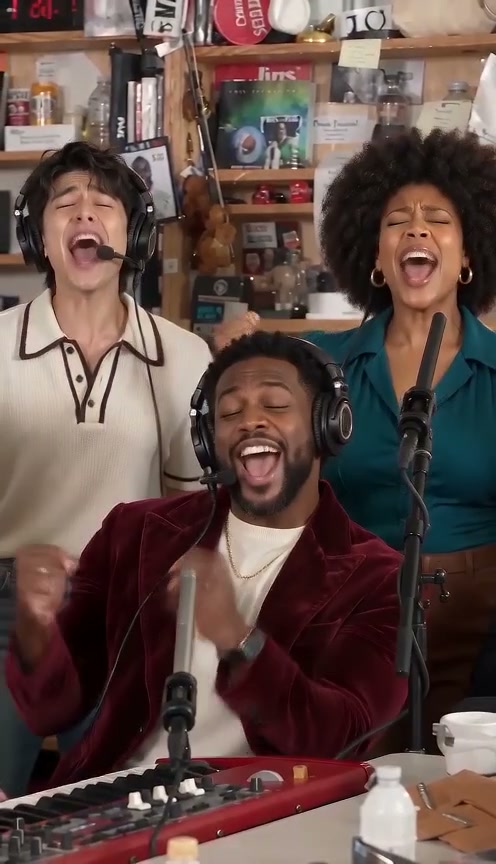
The Tiny Desk AI trend puts anyone behind the desk of Charlie Wilson's NPR Tiny Desk concert: a crowded office corner, headphones on, the band shouting the hook, a lead singer laughing through "Outstanding" and a sax solo. Since 19 October 2026 people have made it with college coaches, NFL coaches, their teams and their families. This guide covers where it comes from, every shot, the photos you need, the one-photo way, who to cast in each spot, the do-it-yourself method and what goes wrong.
What the Tiny Desk AI trend is
Charlie Wilson sang "Outstanding" at an NPR Tiny Desk concert with his band packed behind the desk; a repost by @old.schoolmusic has been on TikTok since August 2023. On 19 October 2026 @theburnerfromhe11 posted an AI parody, "College Football's Week 8 All-Loss Tiny Desk Concert", with coaches in team hoodies as the band. It passed 2.6 million plays in a week.
@lawsnation made the NFL version on 23 October. Tutorials (@wilmavargas511) and a CapCut template (@lamlthanh59) followed within two days.




The 19 seconds, shot by shot
Every AI version keeps the same five shots and the same four hard cuts. Voices are heard only four times; the rest is groove, grins and the laugh.
| Time | Who is on screen | What happens |
|---|---|---|
| 0–1.3 s | The lead, side close-up | Headphones on, nodding through the instrumental intro, not singing yet |
| 1.3–6.7 s | The band | The keyboard player and backup singers shout the two-word hook with fists pumping, then grin and sway |
| 6.7–13 s | The lead, front close-up | A short rising line, a huge silent laugh with the head thrown back, a little finger wave, the next line |
| 13–16.4 s | The sax player | Hard cut to the sax solo, the keyboard player's head in the foreground |
| 16.4–19 s | The band | The last line together, palms up, an arm in the air, then the held pose |
The laugh is the moment people share. A version where the lead only smiles through the close-up loses the joke.
What you need
- One to five photos: one adult per photo, face clearly visible and facing the camera. The lead gets a long close-up.
- Permission: your own photo or friends who agreed. Never a celebrity, a real coach or player, or a child.
- An AI video tool that takes a reference video: our Tiny Desk AI template, or a model such as Seedance 2.0 with a cut of the trend clip as the motion reference.
Method 1: the template (about 10 minutes)
Open the template
Go to the Tiny Desk AI video generator. The trend clip is already set as the motion reference, with the sound ready.
Add the band
Upload the lead singer's photo. Add the sax player, the keyboard player and the two backup singers if you have them; empty spots get invented musicians.
Generate and post
The video is made in two parts, 13 and 6 seconds, at the same time, and joined on the hard cut into the sax solo. You get one 19-second 9:16 MP4 with the trend sound; failed videos are refunded automatically. Post it with #tinydesk and label it as AI-generated.
Make the Tiny Desk AI video with 5 photos
19-second 9:16 video with the trend sound, from 110 credits. No prompt needed.
Open the Tiny Desk AI generatorWho goes in which spot
| Spot | Screen time | Best for |
|---|---|---|
| Lead singer | The opening close-up and the long laughing close-up, about 7 seconds | You, the birthday person, the one who lost the bet |
| Sax player | The solo close-up, about 3.5 seconds, filling the frame | The friend with the biggest personality |
| Keyboard player | Front and centre in both band shots, and in the foreground of the solo | Your second-funniest friend |
| Backup singer 1 | Behind on the left in both band shots | Anyone who wants in |
| Backup singer 2 | Behind on the right, punches a fist up and raises an arm at the end | Anyone who wants in |
Photo advice
- The lead's face matters most. Front light, no sunglasses, no hat brim over the eyes.
- One person per photo. Upload separate photos, never one group shot.
- Clothes come from the photo. Matching hoodies or team colours make the band look planned; prints and logos become plain.
- Give the sax spot a clear photo too. The sax player fills the frame for the whole solo.
Method 2: make it yourself with an AI video model
The timing is the joke, so a text prompt alone gives you a generic band in an office. You need a model that takes a reference video plus photos, such as Seedance 2.0. Most stop at 15 seconds, and the trend runs 19.
Cut the clip in two
Split it at 13 seconds, the hard cut into the sax solo. A cut is already expected there, so the join does not show.
Generate both parts with the same photos
Same photos in the same order, 9:16. Tell each part which part it is, which shots it holds and who replaces whom.
Join and add the sound
Put the parts end to end, then lay the trend sound under the whole video from the first frame so the hook and the laugh land on it.
What your prompt has to cover
- Who is who. Map each photo to a spot: lead, sax, keys, backup left, backup right.
- Replace every stand-in. Describe each person in the reference clip and say who takes their place. The sax player fills the frame alone, so models copy that face unless you say it twice.
- When lips move. Voices come in at about 1.4, 6.8, 11.2 and 16.7 seconds. Outside those windows nobody mouths words, and the laugh is silent.
- No text, no logos, no famous faces. The trend clips use real coaches and team gear; ask for plain clothes and no readable letters.
- Five adults. Say exactly five performers, or the band grows or shrinks between parts.
Common mistakes and how to fix them
- The video stops at 15 seconds. Make it as 13 + 6 seconds and join on the sax cut.
- The sax player has the wrong face. Name the stand-in in the reference clip and say the sax player is the person in your photo, from the first frame of the solo to the last.
- The band changes after the cut. Use the same photos in both parts and describe the invented bandmates the same way.
- Lips flap through the groove. Say exactly when voices are heard and keep lips still in between.
- A group photo for the band. Upload one photo per person; group photos mix faces.
Label your video as AI-generated where TikTok, Instagram or YouTube ask.
Tiny Desk AI examples
The AI version that started the trend, the NFL version and the tutorials that spread it.
College Football's Week 8 All-Loss Tiny Desk Concert 😭🎤 #alabama #CollegeFootball
#Cowboys Jerry Jones & the NFC East Coaches Form a Band 😂🎷 | Tiny Desk Concert
tiny desk concert outstanding ai tutorial
#capcut #capcutpioneer tiny desk concert outstanding ai tutorial
Make the Tiny Desk AI video with 5 photos
19-second 9:16 video with the trend sound, from 110 credits. No prompt needed.
Open the Tiny Desk AI generatorFAQ
What song is in the Tiny Desk AI trend?
"Outstanding", sung by Charlie Wilson at his NPR Tiny Desk concert. The AI versions keep the sound and replace the band.
Who made the first Tiny Desk AI video?
The first AI version we found is "College Football's Week 8 All-Loss Tiny Desk Concert" by @theburnerfromhe11 on TikTok, posted on 19 October 2026.
How long is the Tiny Desk AI video?
19 seconds, 9:16. Models make at most 15 seconds at a time, so it is made as 13 + 6 seconds and joined on the hard cut into the sax solo.
Can I do it with only one photo?
Yes. You sing lead and the AI invents the keyboard player, the sax player and two backup singers.
Is there a Tiny Desk AI CapCut template?
Yes, since 25 October 2026. CapCut pastes faces onto an existing clip; an AI generator films the whole band again with your people and their own clothes.