How to Make the Birthday Car AI Video
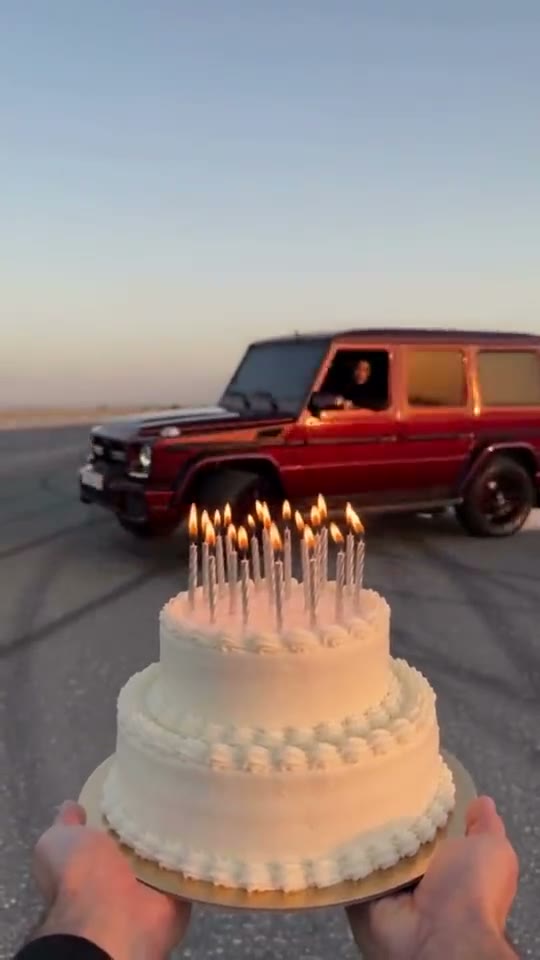
The Birthday Car AI trend is the internet's favorite birthday entrance: a friend holds a two-tier cake on a desert lot at sunset, a dark-red luxury SUV drifts in through tire smoke, you lean out of the window, blow out the candles, and the screen freezes in black and white. It started with @mira__98kr in early October 2026 and went global when @udinu281's sunset desert drift passed 94,000 likes in 15 hours. This guide covers where it came from, the 8-second beat-by-beat breakdown, how to create your own from one photo, the DIY prompt for Seedance 2.0 Fast, and how to add your age in CapCut or TikTok.
What the Birthday Car AI trend is
The Birthday Car trend is a first-person birthday reel: a friend holds a cake with tall lit candles, an SUV drifts in sideways through tire smoke, the driver leans out of the window and blows out every candle at once, and the frame freezes in black and white.
On 5 October 2026, creator @mira__98kr posted the first car version on Instagram: a black SUV pulling up on a wet city street at dusk. On 28 October 2026, travel creator @udinu281 posted the desert drift version in a dark-red SUV at golden hour sunset, which accumulated over 94,000 likes in its first 15 hours. Today, people search for it worldwide under names like *drift birthday cake*, *birthday car reel*, and *arabada mum üfleme trendi*.
The 8 seconds, beat by beat
Every video follows a continuous single handheld camera path anchored by the hands holding the cake:
| Time | What happens | Why it matters |
|---|---|---|
| 0–2 s | Two hands hold the lit cake in foreground; the SUV approaches across the lot with white tire smoke | Establishes first-person perspective and builds anticipation |
| 2–3 s | The vehicle drifts in fast and swings sideways in a cloud of billowing smoke | The high-energy stunt hook that captures social feeds |
| 3–5 s | The SUV slides past just behind the cake and stops; the driver window rolls down | Positions the driver directly above the candles |
| 5–6 s | The driver leans out toward camera, hair blowing in the wind, and blows out the candles | The core birthday moment executed with genuine expressions |
| 6–8 s | The picture transitions to black-and-white and freezes on that proud moment | Cinematic ending ready for custom age captions or text stickers |
The video ends clean on the black-and-white freeze without burned-in text. This lets you add your custom age (e.g. 'Hello 30' or 'Hello 25') in your favorite video editor.
What you need
- One clear photo: One adult facing the camera, with the face large, sharp, and evenly lit. A chest-up or head-and-shoulders portrait works best so your hair and outfit are captured.
- Hair as you want it: Your hair blows in the wind as you lean out of the driver's window, so its color, length, and style carry over directly from your photo.
- Permission: Only use photos of yourself or friends who explicitly consented. Never use photos of public figures or unauthorized third parties.
- AI video engine: Our Birthday Car AI Video Generator, powered by Seedance 2.0 Fast with motion reference and original sound preservation.
Method 1: The one-photo generator (3–5 minutes)
Open the Birthday Car maker
Visit the Birthday Car AI generator. The motion reference, sunset lighting, and synchronized audio are pre-configured.
Upload your portrait
Upload one clear front-facing photo of yourself or a friend. Avoid sunglasses, heavy filters, or crowded group shots.
Choose your scene & resolution
Pick between Desert Drift (the viral sunset SUV), or City Night (wet cobblestone street). Select 480p Lite (70 credits) or 720p Standard (100 credits).
Generate & preview
Click Generate. Seedance 2.0 Fast renders the full 8-second motion-guided stunt in 3 to 5 minutes. Failed renders are refunded automatically.
Download the clean MP4
Download your clean, unwatermarked vertical 9:16 MP4 complete with authentic drift and candle-puff audio.
Make the Birthday Car video with one photo
8-second 9:16 video with the trend sound, from 70 credits. No prompt needed.
Open the Birthday Car generatorMethod 2: DIY prompt for Seedance 2.0 Fast
If you prefer running prompts directly in an advanced video playground, use Seedance 2.0 Fast in reference-to-video mode with the reference stunt clip attached as `reference_video`:
Prompt for Desert Drift: Recreate the reference video shot for shot: the same empty desert lot with dark tire marks on the ground and low sunset sky, the same handheld first-person camera of the friend holding the cake with both hands, the same timing and moves, the same two-tier white buttercream birthday cake with lit candles, the same dark-red boxy luxury SUV drifting through tire smoke, and the switch to black-and-white freeze after the candles go out. The ONLY change: the driver in the black top who leans out and blows out the candles is the person in reference image 1. Preserve their exact face shape, eyes, skin tone, hair color and style, and natural expressions throughout. Real live-action phone footage at golden hour, no brand badges, no watermarks.
- Reference Video Anchor: Always attach the 8-second drift video so camera motion, cake framing, and car path are physically locked.
- Identity Tokening: Explicitly tell the model that image 1 is an identity reference, not a static first frame, preventing face morphs during fast motion.
- Wind & Smoke Physics: Specify realistic wind dynamics on hair and thick white tire smoke during the drift.
How to add your age ('Hello 30') in CapCut or TikTok
The viral desert drift reel ends with 'Hello 43' written in cursive white script. Because your video freezes cleanly without text, you can easily personalize it with your own milestone age:
Open CapCut, TikTok, or Instagram
Import your downloaded 8-second Birthday Car MP4 video.
Seek to the freeze frame (00:06)
Move the playhead to approximately 6.0 seconds where the picture fades to black and white.
Add a text sticker
Add a Text layer and type 'Hello 30', 'Hello 25', or 'Happy Birthday to Me!'. Choose a clean white handwritten or script font with a subtle drop shadow.
Trim text duration
Set the text start time at 00:06 and keep it on screen until the video ends at 00:08.
Export and post
Export in 1080p and share with hashtags like #birthdaytrend, #birthdaycar, and #birthdaycandles.
Troubleshooting & common mistakes
- Face looks slightly altered: Use a high-resolution, uncompressed headshot with neutral lighting. Avoid dramatic shadows or angled selfies.
- Sunglasses or hats: The model needs full visibility of your eyes, eyebrows, and forehead to reconstruct your likeness during the close-up candle blowing.
- Hair style changes: The AI preserves the hair length and texture from your photo. If you want a specific hairstyle in the car, upload a photo featuring that look.
FAQ
Is the Birthday Car AI generator free?
Every generation runs on high-end Seedance 2.0 Fast GPU hardware: 70 credits for 480p Lite and 100 credits for 720p Standard. Failed renders are refunded immediately to your account balance.
Can I make this video for a male friend or family member?
Yes! The AI transfers any adult face, build, and hairstyle onto the driver position behind the wheel. See the male example on the template page.
Does the download include sound?
Yes. The output video is delivered with the synchronized soundtrack featuring tire screeching, engine drift, upbeat rhythm, and the breath blowing out the candles.