How to Make the AI Hotel Lobby Trend
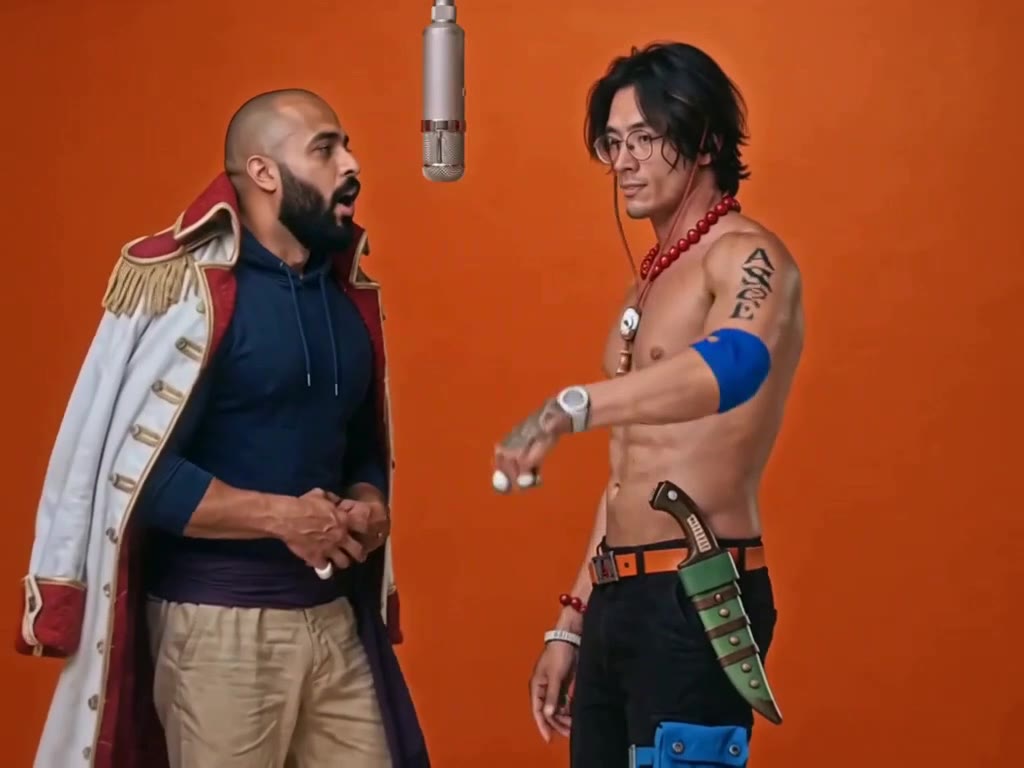
The AI Hotel Lobby trend puts two people in front of a flat orange wall, sharing one microphone that hangs from the ceiling, performing like Quavo and Takeoff in their COLORS session. This guide covers where it came from, the moves to hit, the two-photo way, the do-it-yourself way and the details that make the booth look right.
What the AI Hotel Lobby trend is
It copies one of the most watched performances on the COLORS YouTube channel: Quavo and Takeoff rapping "Hotel Lobby", released on 17 June 2022. On 16 September 2026 @glorify_studio swapped in two characters from Suits and passed 1.8 million plays; within days the booth was full of cats, cartoon characters, couples and coworkers.
Takeoff died in 2022, and some fans have asked people to keep their versions respectful. The format: same booth, same camera, same exchange at the mic, two new people.
The 14 seconds, beat by beat
The camera never moves, so the performance carries everything:
| Time | What happens | Why it matters |
|---|---|---|
| 0–2.5 s | Right performer raps at the mic, arm out at the camera; left one calm, hands clasped | Sets up the two contrasting roles |
| 2.5–5.5 s | Right one counts on their fingers to the beat; left one rubs their hands and smiles | The chemistry |
| 5.5–8.5 s | Right one leans in, rolls both hands, starts turning away | Transition |
| 8.5–11.5 s | Back to the camera, arm over the head; left one takes the verse | The hand-off people copy |
| 11.5–14 s | Slightly tighter: they face each other across the mic and trade the last lines | The finish |
The hanging microphone exactly between the two is the trend's signature. If it disappears, it is just two people in front of a wall.
What you need
- Two photos, one person each, face clearly visible. Photo 1 stands on the left, photo 2 on the right next to the mic.
- An AI video tool that takes two reference photos: our Hotel Lobby template, or Seedance, Kling or Veo.
- The song: added by our template, or picked in TikTok.
Method 1: the two-photo way (about 5 minutes)
Open the template
Go to the AI Hotel Lobby generator. The booth, the mic, the camera and the moves are set up.
Upload two photos
Photo 1 stands on the left, photo 2 on the right and raps toward the mic. Swap them to change sides.
Pick the look
Trend costumes dresses you like the clip: the long white captain's coat and the orange cowboy hat. Your outfits keeps the clothes from your photos.
Keep or drop the sound
The trend sound plays by default; pick No song to add it in TikTok.
Generate and download
Choose 480p, 720p or 1080p. You get a 14-second 4:3 MP4 in a few minutes; failed videos are refunded automatically.
Make the Hotel Lobby video with 2 photos
14-second 4:3 video with the trend sound, from 45 credits. No prompt needed.
Open the Hotel Lobby generatorMethod 2: make it yourself with an AI video model
The booth looks simple, which is exactly why short prompts fail: models add furniture, move the camera or drop the hanging mic. With a model that takes two reference photos, cover every detail.
Choose the model and format
Seedance 2.0, Kling or Veo; 4:3 if available (or 16:9), about 14 seconds.
Add reference stills
Three or four frames from the clip help the model copy the orange, the framing and the mic position.
Describe the booth and the exchange
See the checklist below.
Add the song
Generate without music and pick the trend sound in TikTok or CapCut.
What your prompt has to cover
- The booth. One seamless burnt-orange wall, soft even light, nothing else in the room.
- The microphone. A silver vintage mic hanging on a cable at head height, exactly between the two.
- Left and right. Which photo stands where, who is closer to the mic, and what each wears.
- A static camera. Tripod at chest height, framed from mid-thigh up, no movement.
- The exchange in time slots. Who raps when, the turn-away and the face-off at the end, both lip-syncing on the beat.
Common mistakes and how to fix them
- The mic is missing or on a stand. Describe it hanging on a cable from the ceiling, between the two.
- The camera moves. Say locked-off tripod, no camera movement.
- People swap sides. State left and right for each photo explicitly.
- Extra props appear. Repeat that the room is empty except for the wall and the mic.
Label your video as AI-generated where TikTok, Instagram or YouTube ask. It is required on most platforms and does not hurt reach.
AI Hotel Lobby examples
The Suits swap that started it and some of the most played remakes.
Quavo & Takeoff - HOTEL LOBBY, except it's not them anymore. Same scene, same energy, now it's Harvey and Mike
Quavo saw y'all's aunties and uncles doing that
WhiteBeard & Ace on trend!
The Ultimate "Hotel Lobby" Collab We Didn't Know We Needed
Make the Hotel Lobby video with 2 photos
14-second 4:3 video with the trend sound, from 45 credits. No prompt needed.
Open the Hotel Lobby generatorFAQ
Who will be on the left and on the right?
Photo 1 stands on the left in the long white coat, photo 2 on the right in the orange hat, closer to the mic. Swap the photos to change sides.
Can we keep our own clothes?
Yes. Choose Your outfits and both of you perform in the clothes from your photos; Trend costumes dresses you like the clip.
Is this the original COLORS video?
No. The AI films a new 14-second version of the booth with your two people. We do not use or host the COLORS recording.
Which AI is used for the Hotel Lobby trend?
Image-to-video models that accept two reference photos, such as Seedance, Kling and Veo. Our template runs on Seedance 2.0 with stills from the booth as references.