How to Do the AI Zombie Trend
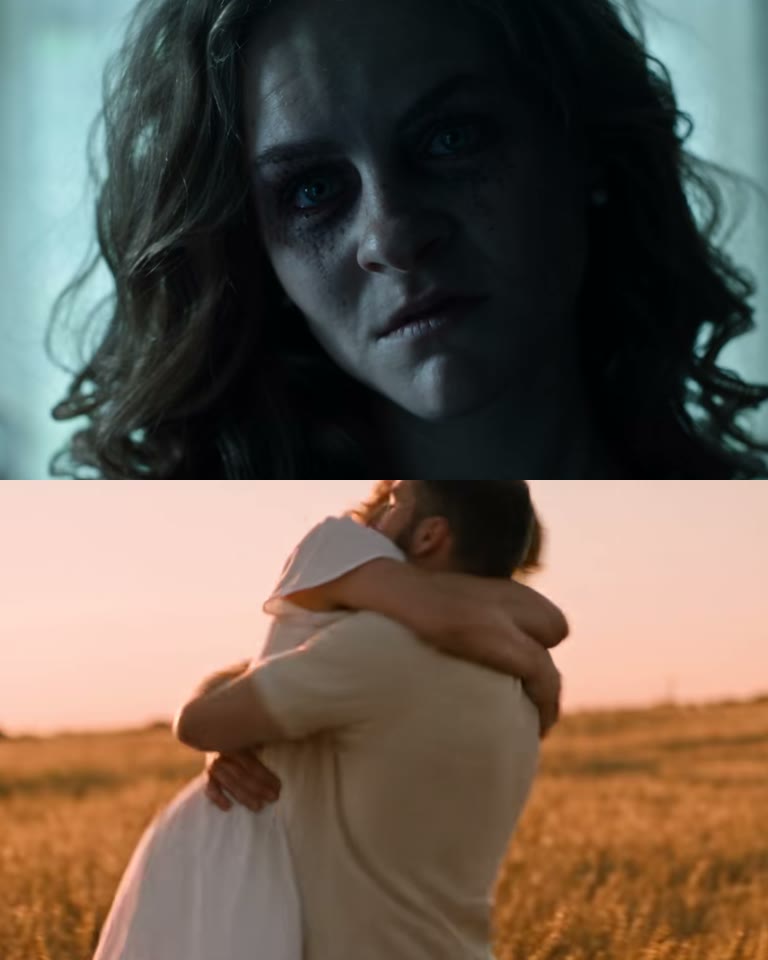
The AI zombie trend, also called the zombie love story or the zombie hug, is a 15-second story: one of you has turned, the other aims a gun, can't fire, and opens their arms. The zombie runs into the hug and the video hard-cuts to a sunset wheat field where you are both healthy again. This guide covers where it came from, the shots that make it work, the two-photo way, the do-it-yourself way, the pet version and the mistakes to avoid.
What the AI zombie trend is
The earliest version we could trace was posted on TikTok on 27 September 2026 by a German account, captioned "#love #zombie #dead #ai #ki": a man can't shoot his zombie wife, she runs into his arms, and the clip cuts to a wheat field at sunset. Its original sound has since been used in more than 1,700 videos. On 1 October @dengljqmy1g opened a how-to with the clip and passed 3.3 million plays, and the caption that stuck arrived a few days later: "Her: Would you still love me as a zombie? Me:".
Couples, parents and kids, best friends and pet owners have all made one. The format is fixed: grey house, gun, open arms, hug, hard cut, wheat field. Only the two faces change, which is why two photos are enough.
The 15 seconds, shot by shot
The trend is a short film, not a single shot. Every convincing version keeps this order:
| Time | What happens | Why it matters |
|---|---|---|
| 0–3 s | The survivor cries and aims a pistol at the camera; the zombie sways by a bright window | Sets up the dilemma in two shots |
| 3–6 s | Slow push-in on the grey face, a flicker of recognition; the survivor's hands shake | The emotional hook |
| 6–8 s | The gun comes down and the survivor opens both arms | The decision people react to |
| 8–9.5 s | The zombie runs across the room and leaps | Builds into the cut |
| 9.5–15 s | Hard cut mid-leap to a sunset wheat field: both healthy, spinning, laughing, falling into the wheat | The payoff, where the music swells |
The hard cut in mid-leap is the whole trend. A fade, a morph or a cut after the hug lands loses the effect.
What you need
- Two photos, one person or pet per photo, face clearly visible and front-facing. Photo 1 turns into the zombie, photo 2 holds on.
- An AI video tool that can keep two faces through a hard cut: our zombie love story template, or a general image-to-video model such as Seedance, Kling or Veo.
- The trend sound: laid under the video by our template, or added in TikTok or CapCut.
- About five minutes with the template; much longer doing it yourself, because multi-shot stories take several attempts.
Method 1: the two-photo way (about 5 minutes)
Open the template
Go to the AI zombie trend generator. The house, the shots, the hard cut and the wheat field are set up.
Upload two photos
Photo 1 is the one who turned, photo 2 is the one who holds on. Swap them to switch roles. No photos to hand? Try the sample people first.
Keep or drop the sound
The trend's original sound is laid under the video by default, swelling on the cut. Pick No song for room sound and wind only.
Generate and download
Choose 480p, 720p or 1080p. You get a 15-second vertical 9:16 MP4 in a few minutes, ready for TikTok; failed videos are refunded automatically.
Make the Zombie Love Story video with 2 photos
15-second 9:16 video with the trend sound, from 50 credits. No prompt needed.
Open the Zombie Love Story generatorThe zombie pet version
Some of the most shared versions bring back a dog or a cat. Put a clear photo of your pet in photo 1 and yourself in photo 2: the pet comes back as a zombie, runs and leaps into your arms, and the video cuts to the two of you in the wheat field.
Use a photo where the pet faces the camera with its eyes visible. Fur colour and markings come from the photo, so avoid heavy filters.
Method 2: make it yourself with an AI video model
You can rebuild the story with a general image-to-video model that accepts two reference photos. The challenge is that it has to tell a nine-shot story with a hard cut and keep both faces the same on both sides of it.
Choose a model that takes two reference photos
Seedance 2.0 handles multi-shot prompts and two faces well; Kling and Veo work too. Pick 9:16 and 15 seconds if available.
Write the story as numbered shots
See the checklist below: two roles, the zombie look, a shot list with times, the hard cut and two colour moods.
Test at low resolution
Iterate at 480p until the cut lands mid-leap and both faces hold, then render in higher quality.
Add the sound
Pick the trend's original sound in TikTok, or lay it in CapCut so the swell hits exactly on the cut.
What your prompt has to cover
- Two people, two roles. Photo 1 is the one who turned, photo 2 the one who holds on. Ask for both faces to match their photos in both halves of the video.
- The zombie look, without gore. Grey skin, cloudy eyes, dark circles, torn dusty clothes, but no blood or wounds. Gore gets blocked by most tools and ruins the mood anyway.
- A shot list with times. Standoff, push-in on the face, the gun coming down, open arms, the run. Without shots you get one long take.
- The hard cut. Name it, put it at about 9.5 seconds in mid-leap, and say no fade and no morph.
- Two colour moods. Cold grey-teal in the house, warm gold in the wheat field, with the same two faces in both.
Common mistakes and how to fix them
- Faces swap or merge. Use two photos that look clearly different, both front-facing, and say which photo plays which role.
- The zombie looks like a horror-movie monster. Tone it down: the point is the hug. Grey skin and cloudy eyes are enough.
- No hard cut. The cut is described but not timed. Pin it to a second and to the moment of the leap.
- The wheat field has different people. Repeat that the same two people appear in the memory, healthy again.
- Cropped faces in vertical. Use photos with some space around the head; 9:16 crops tight.
Label your video as AI-generated where TikTok, Instagram or YouTube ask. It is required on most platforms and does not hurt reach.
AI zombie trend examples
The most played versions on TikTok, including the original clip and two of the tutorials that spread the trend.
How to make zombie effect videos? Zombie AI trend tutorial.
I'd love you, zombie and all, always.
Zombie girlfriend AI tutorial
Viral zombie love apocalypse scene, emotional husband and wife
#love #zombie #dead #ai #ki
Eternal love
Make the Zombie Love Story video with 2 photos
15-second 9:16 video with the trend sound, from 50 credits. No prompt needed.
Open the Zombie Love Story generatorFAQ
How do I do the AI zombie trend on TikTok?
Make the video with two photos in the template on our site, download the 15-second vertical MP4, and post it on TikTok with the trend's original sound. The caption most people use is "Her: Would you still love me as a zombie? Me:".
Can I do the zombie trend with just one photo?
The trend needs two people, one who turns and one who holds on, so the template asks for two photos. One of them can be a dog or a cat.
Which AI is used for the zombie love story?
Most versions come from image-to-video models that take reference photos, such as Seedance, Kling and Veo. Our template runs on Seedance 2.0 and adds the original sound for you.
Is the zombie trend gory?
No. The zombie has grey skin, cloudy eyes and torn clothes, but no blood or wounds. The point of the trend is the hug, not the scare.
How long does it take?
About five minutes with the template, most of it waiting for the video. Failed videos are refunded automatically.