How to Do the Keep On Steppin AI Dance Trend
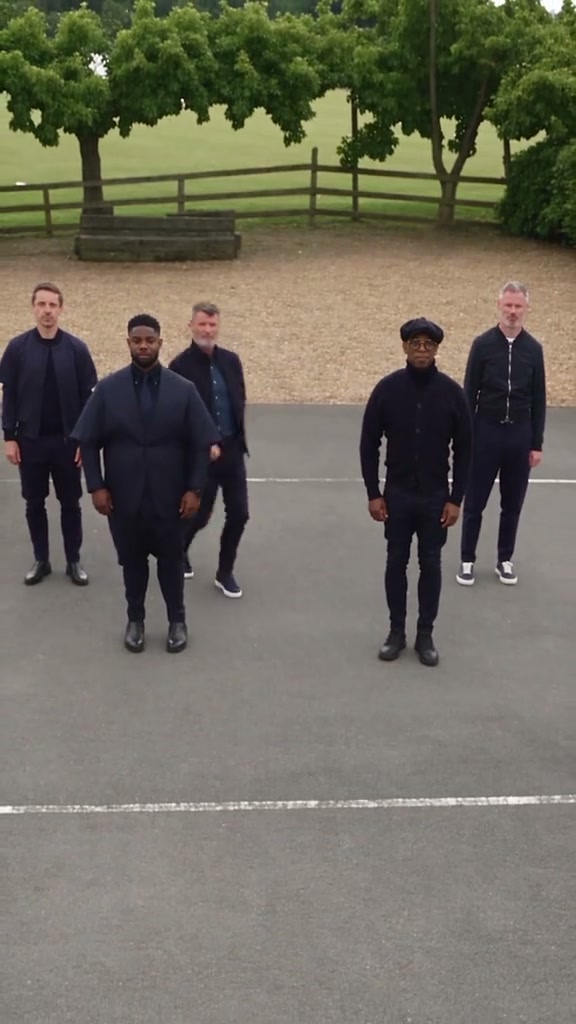
The Keep On Steppin AI dance trend puts you and up to four friends in a 12-second synchronized hip-hop line dance on a sunlit court. Based on Cale Brown's viral choreography to 'Keep On Steppin' by Mike Clark Jr. & Big Boogie, the dance features matching shoulder sways, foot shuffles, knee stomps, and a dramatic low-angle push-in. This complete guide covers where the trend started, the beat-by-beat breakdown, how to cast 1 to 5 people, the prompt structure for image-to-video models, and how to avoid common generation mistakes.
What the Keep On Steppin AI dance trend is
In summer 2024, choreographer Cale Brown (@calebrownn) and four friends posted an outdoor court routine danced in unison to the hard-hitting beat of "Keep On Steppin" by Mike Clark Jr. & Big Boogie. The video instantly exploded across TikTok and Instagram, surpassing 15 million views as creators worldwide formed 5-person squads to recreate the synchronized stomps.
With modern multi-character image-to-video models like Seedance 2.0 Fast, creators can now replace the five dancers with themselves, friends, family, or colleagues while preserving the original energetic choreography and dynamic camera moves. The trend is widely searched as "Keep On Steppin AI Dance", "Cale Brown Dance AI", and "Keep On Steppin CapCut template".
The 12 seconds, beat by beat
Every remake follows the continuous 12-second take on the outdoor court. The camera moves seamlessly from an eye-level group view into a dramatic worm's-eye tracking shot:
| Time | What happens | Why it matters |
|---|---|---|
| 0–3 s | 5 dancers stand in a horizontal line, swaying shoulders and nodding heads to the horns | Establishes the crew formation and confident swagger |
| 3–6 s | Synchronized foot shuffle and arm pump in rhythm | The signature line-dance unison beat |
| 6–8.5 s | Pivot and sharp knee-up stomp; camera cranes down to ground level | The energy peak and dramatic angle transition |
| 8.5–12 s | Low-angle worm's-eye perspective tracking upward as dancers step forward into a freeze pose | The iconic climactic shot straight over the lens |
The line formation requires clear spatial spacing. Giving each dancer a distinct clothing color or jacket style makes the 5-way synchronized footwork look punchy and easy to follow.
What you need
- 1 to 5 photos: One front-facing photo per person with clear lighting. Full-body or waist-up photos are best so outfits and shoes carry into the dance.
- Permission: Photos of yourself and consenting adults only. Never upload celebrities, politicians, or minors.
- An AI video tool: Our Keep On Steppin AI Dance Generator, or an image-to-video model that supports motion reference video such as Seedance 2.0 Fast.
- The audio: The 12-second "Keep On Steppin" track is composited in post-production for crisp, lossless audio sync.
Method 1: The fast template way (1–5 photos)
Open the generator
Head to the Keep On Steppin AI Dance Generator. The court setting, 5 dancer positions, choreography, and soundtrack are pre-configured.
Upload the center lead
Upload your photo for the Center Lead dancer slot (required). You will take the middle spot and lead the group advance.
Add friends or use AI dancers
Optionally upload up to 4 more photos for Far-Left, Mid-Left, Mid-Right, and Far-Right. Any empty slot is automatically filled by an invented AI dancer.
Pick resolution & generate
Select 480p (100 credits) or 720p (140 credits) and click Generate. In a few minutes, download your 12-second vertical MP4 with the track in sync.
Créez la vidéo Keep On Steppin avec 5 photos
Vidéo de 12 secondes au format 9:16, avec le son de la trend, à partir de 100 crédits. Aucun prompt requis.
Ouvrir le générateur Keep On SteppinMethod 2: How to prompt it yourself (Seedance 2.0 Fast)
When prompting Seedance 2.0 Fast directly, general prompts like "five friends dancing hip hop" will fail to maintain 5 distinct identities or nail the camera transition. Follow these key principles:
- Explicitly define 5 discrete spatial roles: Label positions as Far-Left, Mid-Left, Center Lead, Mid-Right, and Far-Right. Map each reference image [Image 1] to [Image 5] to its exact role.
- Name the reference stand-ins: Describe who in the motion plate is being replaced (e.g., Center Lead replaces the dancer in the yellow shirt; Far-Left replaces the dancer in the green jacket).
- Specify the low-angle crane camera: Describe a continuous 12-second 9:16 take that starts at chest height and smoothly descends into a ground-level worm's-eye view tracking backward.
- Lock down wardrobe and faces: Instruct the model to preserve each dancer's facial structure, hair, and clothing from their photo throughout all kicks and turns.
- Silent motion guidance with post-muxing: Feed the clean court plate as silent motion reference, then mux the 12-second AAC track in post-production to prevent audio distortion.
Common mistakes to avoid
- Uploading a group photo into a single slot: Each slot expects one individual. Crop group photos beforehand so the AI doesn't blend faces.
- Tight face crops with no outfit visible: The dance shows head to toe. Waist-up or full-body photos allow the AI to give you authentic streetwear.
- Heavy sunglasses or covered faces: Seedance needs eye and cheek structure to keep faces sharp and recognizable as the dancers step close to the camera.
- Wrong aspect ratio: Always generate in 9:16 vertical to fit TikTok, Instagram Reels, and YouTube Shorts natively.
FAQ
Can I do the Keep On Steppin dance with just 1 photo?
Yes! You only need to upload one photo to the Center Lead slot. The AI automatically generates four stylish backup dancers on the court to complete your 5-person line.
How does the template support up to 5 people?
You can upload separate photos for each position along the court line: Far-Left, Mid-Left, Center Lead, Mid-Right, and Far-Right. Each person retains their own face and clothes.
Does the generated video include the music?
Yes. The 12-second track with the signature brass horns and 808 stomps is composited onto the video in post-production. You can also export silently if preferred.
Why use Seedance 2.0 Fast for this trend?
Seedance 2.0 Fast excels at multi-subject spatial reasoning and motion reference adherence, preventing character morphing during rapid group footwork.